🔐 D666 Login – How to Sign In, Reset Password and Fix Login Problems
This D666 login guide shows returning users how to sign in by password or verification code, how to recover a forgotten password, and how to fix the most common sign-in problems. It is written plainly for Pakistani Android users. 18+ only. Play responsibly.
The login screen accepts a Pakistan phone number (+92) or an email, and offers quick-login icons too. Below you will find clear steps, a troubleshooting table, and security tips so you can get back into your account safely.
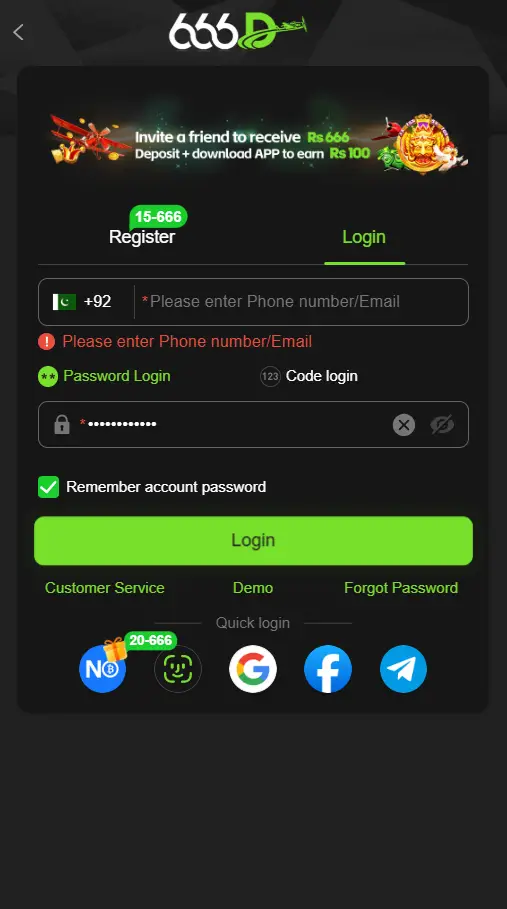
Table of Contents
📋 D666 Login Quick Summary
- Open the app, tap Login, and follow the password or code steps below. New here? Create an account on the D666 register page first.
| Feature | What the screen shows |
|---|---|
| Accepted ID | Phone number (+92) or email |
| Login methods | Password Login, Code login |
| Remember option | “Remember account password” (ticked by default) |
| Quick login | N Wallet, Google, Facebook, Telegram, plus a face/biometric icon [CONFIRM] |
| Helper links | Customer Service, Demo, Forgot Password |
Online gaming laws differ by location. Please check your own local rules before you sign in and play.
🔑 Sign in with a password
- Open the app and tap the Login tab.
- Choose Password Login.
- Enter your registered phone number (+92) or email.
- Type your password; use the eye icon to check it.
- Tick “Remember account password” only on your own private device.
- Tap Login.
If the phone/email field is empty, the screen shows “Please enter Phone number/Email”.
🔢 Sign in with a verification code
- Open the Login tab.
- Choose Code login.
- Enter your registered phone number (+92) or email.
- Request the verification code and wait for it to arrive.
- Enter the code and tap Login.
Never share this code with anyone. Genuine support will never ask you for it.
⚡ Quick Login Options
The screen shows several quick-login icons. Use only accounts that already belong to you.
- N Wallet (shown with a “20-666” badge): sign in or bind using your wallet account.
- Google / Facebook / Telegram: sign in using an account you already own.
- Face/biometric-style icon: its exact function is [CONFIRM what this icon does], so check the prompt on your own screen before using it.
🔓 Forgot password: Safe Recovery
If you cannot remember your password, tap the Forgot Password link on the login screen and follow the official recovery steps. Do not guess repeatedly, and never create a second account to get around the problem – one account per player is the rule, and duplicates can lead to rewards being removed or the account being frozen.
A genuine reset never requires your OTP or withdrawal password.
🧩 Common D666 login problems and fixes
| Problem | Likely cause | Sensible fix |
|---|---|---|
| “Please enter Phone number/Email” | Empty field | Type your registered number or email, then retry |
| Wrong number format | Missing or wrong +92 | Enter the number with the +92 code as shown |
| Wrong password | Typo or changed password | Use the eye icon; if forgotten, use Forgot Password |
| No code received | Network delay or wrong number | Recheck the number, wait briefly, request again |
| App outdated | Old version after an update | Install the current version from the verified source |
| Poor internet | Weak signal | Switch between Wi-Fi and mobile data |
| Site not opening | Address blocked | Use Profile → Find us for backup addresses |
| Account restricted | Policy or security review | Contact in-app Customer Service with your details |
🛡️ Keep your account secure
Visit the Security Center in your profile, and use “Login device” to review which devices have accessed your account. Create a strong, unique password that you do not reuse for banking or email.
Never share your password, OTP or withdrawal password – genuine support, including the WhatsApp button, will never ask for them. Avoid look-alike websites, and always log out on a shared phone.
✅ What you can access after login
Once signed in, you can reach your wallet, promotions, VIP area, missions, events and the invite screen. To add funds, see the D666 deposit guide. To understand cashing out and the withdrawal password, read the D666 withdrawal guide. New accounts start at the D666 register page.
🎮 What demo mode is for
The login screen includes a Demo option. Demo mode simply lets you look around and learn the controls before any real-money play. It does not predict real-money results and is only for familiarising yourself with the layout.
🔁 Login vs register: the difference
Login is for players who already have an account , just sign in with your existing details. Register is for first-time users creating a new account. If you have not signed up yet, start on the D666 register page instead of logging in.
🧭 Responsible gaming
Responsible gaming box: Decide your budget and stopping point before you play, and take regular breaks. Never play with money you need for essentials such as rent, bills or food. Gaming is entertainment, not a way to earn a living. 18+ only. Play responsibly. For support, visit GambleAware or the National Council on Problem Gambling.
❓ Frequently Asked Questions
Can I log in with my email?
Yes. The D666 login field accepts either your registered phone number with the +92 code or your email address. Use the same detail you provided when you created the account, choose Password Login or Code login, and enter your credentials carefully to sign in.
Is there a code login option?
Yes. Besides Password Login, the screen offers Code login, which uses a verification code sent to your registered number or email. Request the code, wait for it to arrive, enter it, and tap Login. Never share this code with anyone, as support never asks for it.
What does “Remember account password” do?
It keeps your sign-in details saved so you do not re-enter them each time. The box is ticked by default. Only leave it on for your own private, screen-locked device. On a shared or public phone, untick it and log out fully after your session.
What if I forgot my D666 password?
Tap the Forgot Password link on the login screen and follow the official recovery steps. Do not guess repeatedly and do not open a second account, since one account per player is the rule. A genuine reset never requires your OTP or withdrawal password.
How do I contact D666 support?
Use the in-app Customer Service option and the floating WhatsApp button only. When reporting a problem, give your account or record details, but never share your password, OTP or withdrawal password – legitimate support will never ask you for any of them.
Can I use two accounts?
No. One account per player is allowed. Multiple accounts, rented accounts, bots, collusion and similar actions are prohibited and can lead to rewards being removed or the account being frozen or blacklisted. Keep a single account and recover it through Forgot Password if needed.