💳 D666 Deposit – JazzCash, Easypaisa, Raast, Bank and USDT Guide
This D666 deposit guide explains how to add funds using JazzCash, Easypaisa, Raast (Manual Transfer), Bank or USDT, what the +3% and +5% tags mean, and what to do if a deposit fails. It is written for Pakistani Android users and uses only what the deposit screen shows. 18+ only. Play responsibly.
The deposit screen has two tabs – Online deposit (+3%) and Crypto (+5%) – and several payment methods. Below you will find the methods, general steps, promotion notes and a troubleshooting checklist.
CTA (near top): Open the app, go to Deposit, pick your method, and follow the steps below. Not signed in yet? Use the D666 login page.
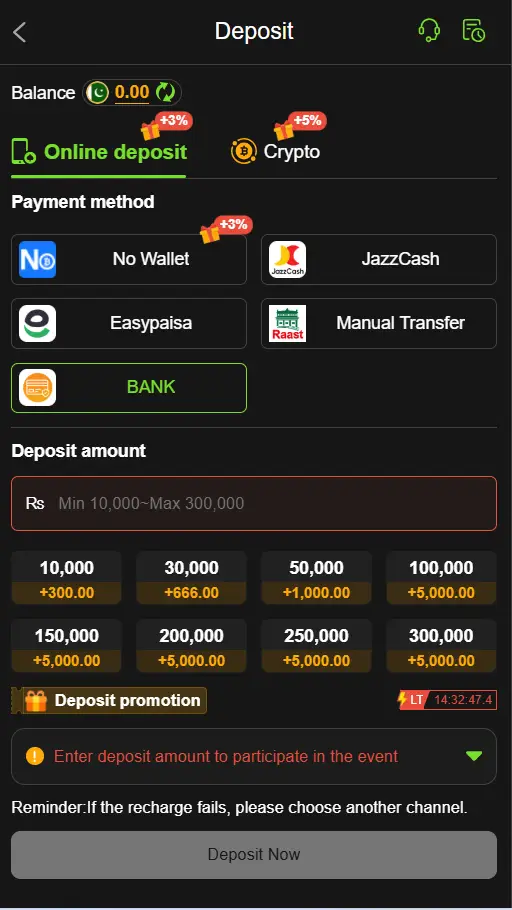
Table of Contents
📋 D666 deposit quick facts
| Detail | What the screen shows |
|---|---|
| Tabs | Online deposit (+3%), Crypto (+5%) |
| Online methods | N Wallet (+3%, shown as “No Wallet” [CONFIRM]), JazzCash, Easypaisa, Manual Transfer (Raast), Bank |
| Bank amount box | Min Rs 10,000 – Max Rs 300,000 (limits differ by channel) |
| Crypto | USDT on TRC20 / BEP20 / ERC20 |
| USDT amount box | Min 1 – Max 50,000 USDT |
| Reminder | “If the recharge fails, please choose another channel.” |
Limits may differ by channel, so always read the amount box in the app. Online gaming laws differ by location , check your own local rules.
💰 Deposit methods overview
| Method | Type | Note |
|---|---|---|
| N Wallet / “No Wallet” [CONFIRM] | Online | Tagged +3% |
| JazzCash | Online | Mobile wallet |
| Easypaisa | Online | Mobile wallet |
| Manual Transfer (Raast) | Online | Bank rail |
| Bank | Online | Min Rs 10,000 – Max Rs 300,000 |
| USDT (TRC20 / BEP20 / ERC20) | Crypto | Tagged +5%; Min 1 – Max 50,000 |
🏦 How to deposit with JazzCash, Easypaisa, Bank or Raast
- Open the Deposit screen and stay on the Online deposit tab.
- Choose your channel (N Wallet, JazzCash, Easypaisa, Manual Transfer/Raast or Bank).
- Enter an amount within the limits shown in the box for that channel.
- Tap Deposit Now (it stays inactive until you enter an amount).
- Follow the on-screen payment instructions: [CHANNEL STEPS — owner to confirm].
- Check Deposit history (top-right icon) to confirm the balance was credited.
Keep your payment receipt until the balance appears. If a channel fails, the app suggests choosing another channel.
🪙 How to deposit with USDT
- Open the Deposit screen and tap the Crypto tab.
- Choose the network , USDT-TRC20, USDT-BEP20 or USDT-ERC20 , and note the per-network range.
- Enter the amount (Min 1 – Max 50,000 USDT); the switch button toggles between USDT and the deposit amount.
- If you do not own USDT yet, buy it on a crypto exchange first (the app mentions Binance), then deposit.
- Double-check the network before sending , sending on the wrong network can lose your funds permanently.
- Confirm the transfer and check Deposit history.
A live exchange rate is shown on screen; it changes constantly, so rely on the figure in the app at the moment you deposit.
🎁 Deposit promotions and bonuses
The screen shows quick-amount buttons with extra amounts and a “Deposit promotion” row with a countdown timer. These are time-limited promotions that can change and carry conditions , they are not guaranteed cash.
| Deposit amount (Rs) | Extra shown |
|---|---|
| 10,000 | +300 |
| 30,000 | +666 |
| 50,000 | +1,000 |
| 100,000 | +5,000 |
| 150,000 / 200,000 / 250,000 / 300,000 | +5,000 each |
The screen text “Enter deposit amount to participate in the event” means the promotion applies only when you enter a qualifying amount during the active window.
🧩 Deposit failed or not credited
- If a channel fails, choose another channel as the app suggests.
- Check that your amount is within the channel’s limits.
- Open Deposit history to see the current status.
- Keep your payment receipt or transaction reference.
- Contact in-app Customer Service with your record details.
- Never share your OTP, PIN, password or withdrawal password with anyone.
🛡️ Safety when depositing
Use only the in-app deposit screen. Never send money to a personal account suggested by a stranger, and be wary of “agents” who contact you privately. Keep every receipt, and confirm the receiver details shown in the app before transferring. Genuine support never asks for your OTP, PIN or passwords.
🧭 Responsible gaming
Responsible gaming box: Set a deposit budget before you add funds and stick to it. Take breaks, and never deposit money you need for rent, bills, food or other essentials. Gaming is entertainment, not a way to make a living. 18+ only. Play responsibly. For support, visit GambleAware.
🔁 Withdrawals and VIP
Before withdrawing, you will need a withdrawal password and to meet any wagering requirements , see the D666 withdrawal guide. Deposits also affect VIP: moving from VIP0 to VIP1 needs a Rs 100 deposit and Rs 800 in bets. New here? Start at the D666 register page.
A D666 deposit should always be made within a budget you can comfortably afford. 18+ only. Play responsibly.
❓ Frequently asked questions
What is the minimum D666 deposit?
It depends on the channel. The Bank channel shows a minimum of Rs 10,000 and a maximum of Rs 300,000, while USDT shows a minimum of 1 and maximum of 50,000. Limits differ by method, so always read the amount box on the deposit screen in the app before confirming.
Which deposit methods are supported?
The Online deposit tab shows N Wallet, JazzCash, Easypaisa, Manual Transfer (Raast) and Bank. The Crypto tab shows USDT on TRC20, BEP20 and ERC20 networks. Availability can change, so check the current deposit screen in the app for the methods shown to your account.
What do the +3% and +5% tags mean?
They are promotional tags shown on the Online deposit (+3%) and Crypto (+5%) tabs, indicating a time-limited extra on qualifying deposits. These promotions carry conditions and can change, so confirm the current terms on the deposit screen before you add funds.
Is USDT supported on D666?
Yes. The Crypto tab accepts USDT on TRC20, BEP20 and ERC20 networks, with a range of 1 to 50,000. Buy USDT on a crypto exchange first if you do not own any, and always double-check the network before sending, as the wrong network can lose your funds.
What if my D666 deposit fails?
Follow the app’s reminder and choose another channel. Confirm your amount is within the channel limits, open Deposit history to check the status, and keep your receipt. If the balance is still missing, contact in-app Customer Service with your details, but never share your OTP, PIN or passwords.
Is there a deposit limit?
Yes, limits are shown per channel in the amount box. For example, the Bank channel shows Rs 10,000 to Rs 300,000 and USDT shows 1 to 50,000. Because limits differ by method and can change, always read the box on the current deposit screen before confirming your amount.