📋D666 Register – Create Your Account Step by Step
This D666 register guide walks new users through creating an account by phone number or email, binding a wallet, and understanding the new-player bonus rules before they start. It is written for Pakistani Android users who want a clear, honest overview. 18+ only. Play responsibly.
The register screen confirms you are over 18 and asks you to agree to the User Agreement. Below you will find step-by-step instructions, the new-player missions table, and the rules in plain words so there are no surprises.
CTA (near top): Open the app, tap Register, and follow the steps below. Already have an account? Head to the D666 login page.
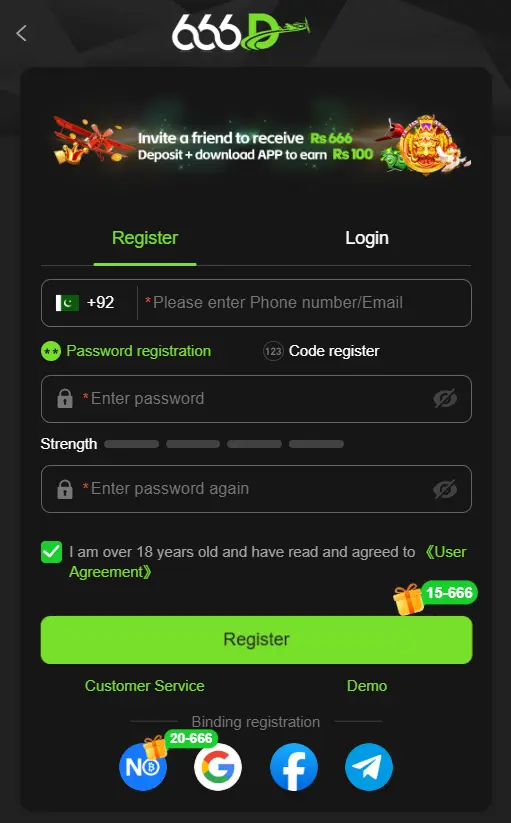
Table of Contents
📋 D666 register requirements
| Requirement | Detail |
|---|---|
| Age | 18+ (pre-ticked “I am over 18” + User Agreement) |
| ID | Phone number (+92) or email |
| Methods | Password registration, Code register |
| Password | Enter twice; 4-segment strength meter; rules [PLACEHOLDER] |
| Accounts | One account per player |
Online gaming laws differ by location. Please check your own local rules before registering.
🔑 Register with a password
- Open the app and tap the Register tab.
- Choose Password registration.
- Enter your phone number (+92) or email.
- Enter a password, then enter it again to confirm. Watch the strength meter and aim for a strong password.
- Leave the “I am over 18 years old … User Agreement” box ticked only if it is true and you agree.
- Tap Register.
🔢 Register with a code
- Open the Register tab.
- Choose Code register.
- Enter your phone number (+92) or email.
- Request the verification code and enter it when it arrives.
- Confirm the 18+ and User Agreement box, then tap Register.
Keep your verification code private at all times.
⚡ Binding registration options
The screen shows “Binding registration” icons: N Wallet (with a “20-666” badge), Google, Facebook and Telegram. These let you create or link your account using an account you already own. The “20-666” badge is a promotion with conditions, described more fully in the missions section – it is not guaranteed cash.
✅ After registering: verification and withdrawal password
After creating your account, you will usually need to complete SMS verification and bind a payment method before you can claim new-player rewards.
You will also be prompted to set a 6-digit withdrawal password (“For the safety of your funds, you need to set a withdrawal password first!”). Learn more in the D666 withdrawal guide. To add funds for the first-deposit task, see the D666 deposit guide.
🎁 New-player missions and rules
These are the new-player tasks shown under Promo → Mission → Newplayer. Reward ranges are shown as a band, and the exact amount depends on the app’s rules , treat them as promotions with conditions.
| Task | Reward shown | Button |
|---|---|---|
| Sign up an account | Rs 15.00 – 666.00 | Claim |
| Link N Wallet for payment | Rs 20.00 – 666.00 | Claim |
| Login to the APP (first deposit) | Rs 100.00 – 666.00 | Go |
The payment wallet is shown in the app as “N Wallet / No Wallet / Not Only Wallet” [CONFIRM EXACT WALLET NAME]. A Daily Mission tab also shows 4 reward chests needing 200 / 300 / 500 / 800 energy.
Rules in plain words:
- New users registering for the first time only.
- SMS verification and payment-method binding are required before claiming.
- Rewards must be claimed manually before they expire, and only on Android_H5, iOS_H5, Android_APP or iOS_APP.
- The new-player bonus needs 20x wagering (valid bets) before withdrawal.
- Wagering counts only on Fishing (all games), Slots (WG/PG/PP/JDB/MG/JILI/CQ9) and Blockchain/crash games (WG Aviator and Crash, Spribe, INOUT, 2J Aviator).
- One account per player. Multiple accounts, rented accounts, bots, cheats, collusion, arbitrage and bug exploitation are prohibited and can lead to forfeited rewards and a frozen or blacklisted account.
- The platform may change or cancel promotions and keeps the final interpretation.
An invite program is also available: an invitee can get up to Rs 666, and each user has an invitation code, link and QR code.
🧩 Common registration problems
- Code not received: recheck the number, wait briefly, then request again.
- Wrong +92 format: enter the number exactly with the +92 country code.
- Password too weak: use the strength meter; mix letters, numbers and symbols.
- Number already used: that number may already have an account – try the D666 login page or recover the existing account instead of creating a new one.
🚫 The one-account rule
D666 allows only one account per player. Creating duplicates , or using rented accounts, bots or collusion , is risky and can lead to rewards being removed and the account frozen or blacklisted. If you cannot access an old account, recover it rather than registering again.
🧭 Responsible gaming
Responsible gaming box: Set a budget and a time limit before you start, and take breaks. Never play with money you need for essentials. Gaming is entertainment, not a way to make a living or guaranteed income. 18+ only. Play responsibly. For support, visit GambleAware.
❓ Frequently asked questions
Is D666 registration free?
Creating an account is free. The register screen asks for a phone number or email, a password, and confirmation that you are 18+ and agree to the User Agreement. Bonuses shown during sign-up are promotions with conditions such as verification, wagering and expiry , not guaranteed free money.
Can I register with my email?
Yes. The D666 register field accepts either a phone number with the +92 code or an email address. Choose Password registration or Code register, enter your details, confirm you are over 18, agree to the User Agreement, and tap Register to create your account.
What does the “15-666” badge mean?
It refers to the new-player sign-up task, which shows a reward range of roughly Rs 15 to 666. It is a promotion with conditions: new users only, SMS verification and payment binding first, manual claiming before expiry, and 20x wagering before any withdrawal. It is not a fixed, guaranteed amount.
Do I need to verify my phone?
Yes, for new-player tasks you generally need SMS verification and a bound payment method before claiming rewards. Enter the verification code only on the app’s registration screen, keep it private, and never share it with anyone who contacts you claiming to help.
Why was my bonus not credited?
Common reasons include incomplete SMS verification, no bound payment method, the reward expiring before a manual claim, or the 20x wagering requirement not being met on eligible games. Check the mission rules in the app, and contact in-app Customer Service without sharing your password or OTP.
Can I create a second account?
No. One account per player is the rule. Duplicate accounts, rented accounts, bots and collusion are prohibited and can lead to forfeited rewards and a frozen or blacklisted account. If you lost access to an old account, recover it through the official process instead.